
Активація ліцензій програм PF-Soft
Вибір ліцензії
Запустіть програму та перейдіть на сторінку вибору ліцензій програми. Для цього скористайтесь командою меню та натисніть на посилання "Придбати ліцензію". У списку доступних ліцензій виберіть необхідну та натисніть відповідне посилання "Купити".Оплата обраної ліцензії
Виберіть доступний для вас спосіб оплати та пройдіть процедуру до кінця, слідуючи інструкціям. Особливу увагу приділіть введенню реєстраційних даних - імені та адреси електронної пошти. Ліцензія буде зареєстрована на вказане ім'я, а на вказаний Email буде надіслана вся необхідна інформація.-
Активація ліцензії
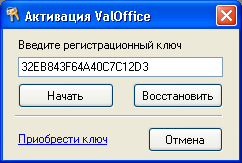 В отриманому повідомленні буде вказано ваш реєстраційний ключ (або ключі, якщо ви придбали кілька
ліцензій).
Запустіть програму та відкрийте діалог активації програми.
Для цього скористайтесь пунктом меню
або натисніть клавішу F12.
У вікні, що з'явиться, введіть у відповідне поле введення отриманий реєстраційний ключ та
натисніть "Почати".
В отриманому повідомленні буде вказано ваш реєстраційний ключ (або ключі, якщо ви придбали кілька
ліцензій).
Запустіть програму та відкрийте діалог активації програми.
Для цього скористайтесь пунктом меню
або натисніть клавішу F12.
У вікні, що з'явиться, введіть у відповідне поле введення отриманий реєстраційний ключ та
натисніть "Почати".
Для процедури активації необхідна наявність прямого підключення до мережі Інтернет.
У разі успішної активації ви отримаєте відповідне повідомлення. Після активації програму рекомендується перезапустити.
-
Відновлення ліцензії
Якщо в процесі використання програми внаслідок зміни або встановлення програмного чи апаратного забезпечення ліцензія програми втратилась, можна спробувати її відновити. Для цього відкрийте діалог активації програми (як описано в попередньому пункті) та зробіть наступне:- Якщо апаратне забезпечення вашого комп'ютера (процесор, BIOS, жорсткий диск) не змінювалося - видаліть усі символи з текстового поля для введення реєстраційного ключа та натисніть кнопку "Відновити". Програма спробує автоматично за номером вашого комп'ютера знайти на сервері реєстрації ваш реєстраційний ключ та активувати його.
- Якщо апаратне забезпечення вашого комп'ютера змінилося і це призвело до зміни номера комп'ютера - введіть у текстове поле для введення ваш реєстраційний ключ та натисніть кнопку "Відновити". Відновлення ключа в даному випадку можливе лише тоді, коли хоча б два апаратні пристрої з трьох (процесор, BIOS, жорсткий диск) не змінилися.