
Як забути про ручне завантаження курсів валют у QDPro
Ця стаття призначена для уваги користувачів, які працюють з програмою для заповнення вантажних митних декларацій QDPro (QD Professional) і присвячена проблемі автоматизації завантаження курсів валют до її бази даних. Існує кілька способів внести свіжі курси валют до бази даних цієї програми. Розглянемо їх:
Спосіб №1. Скористатися утилітою QDSetup. Для цього потрібно зробити наступне:
- Запускаємо QDSetup (меню "Пуск-Всі програми-Intes-QDSetup");
- У вікні, що з'явилося, вибрати "Оновити" і натиснути кнопку "Вперед";
- Вибрати "Інтернет" і натиснути кнопку "Вперед";
- Вибрати тип підключення до Інтернет ("Пряме") і натиснути кнопку "Вперед";
- Вибрати сервер ("Київ") і натиснути кнопку "Вперед";
- У діалоговому вікні, що з'явилося, обов'язково встановити галочку "Курси валют" (а решту галочок зняти) і натиснути кнопку "Вперед". Після виконаних маніпуляцій програма завантажить потрібні файли з курсами валют і виведе відповідне вікно з повідомленням, в якому потрібно натиснути кнопку "ОК";
- Запустити програму QDPro.
Спосіб № 2. Завантажити курси валют з файлу у форматі НБУ, попередньо отриманого за допомогою розсилки електронною поштою або завантаженого з сайту програми QDPro. Для цього потрібно зробити наступне:
-
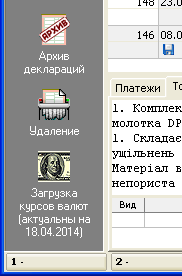 Отримати або завантажити потрібний файл і зберегти його в якійсь спеціально відведеній для зберігання таких файлів папці;
 - Запустити програму QDPro;
- Утримуючи клавішу Shift натиснути на кнопку завантаження курсів валют (знаходиться в самому низу панелі керування зліва);
- У діалоговому вікні вибору папок потрібно вибрати папку, в яку ви зберегли файл з курсами валют. Після натискання кнопки "ОК" програма завантажить курси валют з файлів, що знаходяться в цій папці.
Як видно, обидва способи є досить клопіткими, і мимоволі виникає питання про те, чи не можна яким-небудь чином уникнути всіх цих маніпуляцій з файлами та утилітами. Цілком підходящим вирішенням цього питання може стати використання програми ValOffice.
Яким чином ця програма може допомогти уникнути описаних вище маніпуляцій? Справа в тому, що ця програма автоматично запускається під час завантаження операційної системи і виконує, по суті, ті ж дії для отримання курсів валют, що й QDSetup, але робить це у фоновому режимі. Таким чином, після завантаження Windows ця програма збереже файл з курсами валют у необхідній папці, і коли користувач запустить QDPro, вони будуть завантажені в програму.
Крім повної автоматизації отримання курсів валют програма ValOffice також допоможе вам:
- Дуже швидко дізнатися курс валют, оскільки іконка програми завжди знаходиться в системній області і все, що потрібно - лише навести на неї курсор миші;
- Роздрукувати курси валют;
- Скопіювати курс валюти в буфер обміну Windows;
- Переглянути динаміку зміни курсів валют.