
FAQ on Common Errors
Below are the most common errors, shared by all our programs, and their solutions. For answers to specific questions regarding any individual program, see the "FAQ" subsection on the corresponding program's page.
- During the program update check, the following error occurred: 'Access to the path "C:\Program Files (x86)\PF-Soft\..." was denied.'
-
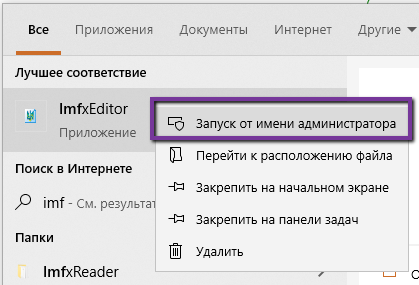 To correctly update program components (replacing files from the previous version), you need to have administrator rights.
To do this, you must run the program as an administrator.
To correctly update program components (replacing files from the previous version), you need to have administrator rights.
To do this, you must run the program as an administrator.
You can do this as follows: right-click on the program launch shortcut and in the context menu that appears, select "Run as administrator".
- During the program update check, the following error occurred: 'The remote name could not be resolved: 'pf-soft.net''
-
Most of our products have an auto-update feature that allows the program to automatically detect, download, and install new updates. For this feature to work, a direct connection to our update server is required. If the connection is absent for any reason, the aforementioned error occurs. The cause of the missing connection can be various technical problems either on our server's side (very rarely, but it happens) or on your side. The check for new updates happens when the program starts.
If this error occurs rarely, it can simply be ignored. However, if you plan to use the program on a computer that lacks a direct internet connection, then in this case, it is better to disable the auto-update. This can be done in the program settings in the "Update" section. In the "Auto-update" parameter, you need to select the value "Disable automatic update" and save the settings.
- During registration, an error occurred: 'Error 204: Registration record '********************' not found!'
-
This error occurs during the activation of the registration key when the key you are trying to activate is not found in the registration server's database. A similar error will also occur when attempting to reactivate an expired key.
To avoid this error, use legally obtained keys for activation. Also, pay attention to the correctness of entering the key in the activation field. Do not enter the code manually; use copy and paste from the clipboard.
- During registration, an error occurred: 'Error 601: The new computer identifier '********************' is not sufficiently similar to the old one '********************'!'
-
When activating a registration key, the license for the activated copy of the program is bound to the hardware of the computer on which the activation was performed. Changing the hardware leads to the license being revoked. If there have been minor changes in the hardware, then in this case, you can use license recovery. The aforementioned error occurs if it is impossible to recover the license due to significant changes in the computer's hardware.
If you encounter such an error during license recovery, you will have to purchase a new license.